这篇也收在 aaronlau.me:Nginx 默认只改两个请求头
Nginx 学习笔记 (a1) - proxy_set_header 的默认值
这篇文章写于 2019 年,距今 7 年。文中的做法和默认值可能已经变化,动手前请对照官方文档。

Appendix
By default, only two fields are redefined:
proxy_set_header Host $proxy_host; proxy_set_header Connection close;
proxy_set_header 默认重定义两个 Header 头字段,Host 初始值 $proxy_host,这是因为 HTTP/1.1 必须包含 Host 字段以指定主机;至于 $proxy_host 跟 $host 的区别,前者是 backend 即后端的主机名,后者是 frontend 即自身的主机名。该字段要不要改成 $host 或 $http_host,视后端会不会校验域名和端口而定。举个例子,假设 proxy_pass 的目标 (对象) 是一组 upstream,如果后端只接收 Host 是 www.example.com 的请求,由于此处 $proxy_host 是这组 upstream 的名字,那么后端不会响应该请求,变通办法正是改写 Host 字段的值。
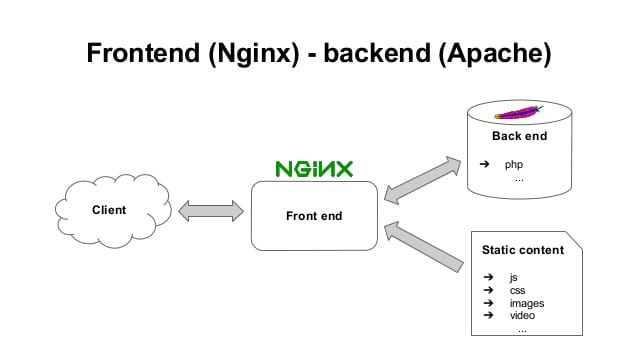
Connection 初始值 close,也是因为在 HTTP/1.1 中所有连接都是长连接 (keep-alive),除非声明 close 表示不需要,而后端的 Web 应用程序 (HTTP/1.0 或更古早的) 未必支持连接复用,所以统统设成 close 以免出错。跟后端通讯真需要用到 keep-alive,先配置一组 upstream (上游服务器),回头再清空 Connection 字段即可。商用版 Nginx Plus 还支持在集群中使用 resolve 指令。
http {
	# resolver 8.8.8.8;

	upstream backend {
		# server www.example.com resolve;
		server www.example.com;
		keepalive 16;
	}

	server {
	    location / {
	        proxy_pass http://backend;
	        proxy_http_version 1.1;
	        proxy_set_header Connection '';
	        # proxy_set_header Host www.example.com;
	    }
    }
}
There is almost no sense to implement it, as the main HTTP/2 benefit is that it allows multiplexing many requests within a single connection, thus [almost] removing the limit on number of simultaneous requests - and there is no such limit when talking to your own backends. Moreover, things may even become worse when using HTTP/2 to backends, due to single TCP connection being used instead of multiple ones.
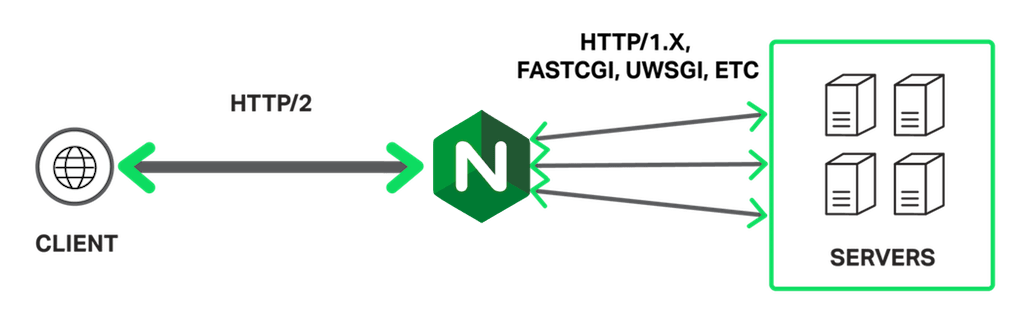
Note: 并没有 proxy_http_version 2.0,甚至于 nginx → upstream 也是默认 HTTP/1.0。HTTP/2 采用单一长连接,多个请求在同一个 TCP 连接并行 (多路复用),可减少客户端到 frontend 的连接数、提升效率。不过在 frontend 到服务端的情境中,连接数并非瓶颈,共用一个连接反而更限制并发能力。
Aaron Lau这里的文章写于 2010 年代。现在每天的文字在 aaronlau.me,手上在做的是 AI System 6。

这篇在 aaronlau.me 也有存档版本。去那边读
评论